How to Claim SEUs & PDUs After Completing a Scrum or Agile Training
Your Complete Step-by-Step Guide for Scrum Alliance (SEUs) & PMI (PDUs)
If you’ve completed a Scrum, Agile, or professional development program and want to maintain your Scrum Alliance or PMI certifications, you’ll need to claim SEUs (Scrum Education Units) or PDUs (Professional Development Units).
This blog walks you through the exact steps to claim both SEUs and PDUs—even when your course provider is a third-party and not pre-approved.
Part 1: How to Claim SEUs (Scrum Education Units)
For Scrum Alliance certifications: CSM, CSPO, A-CSM, A-CSPO, CSP-SM, CSP-PO
Scrum Alliance requires renewing your certifications every 2 years by earning SEUs and submitting renewal fees.

Here is the step-by-step process to claim SEUs:
Steps to Claim SEUs
1. Log in to Your Scrum Alliance Dashboard
Visit: https://www.scrumalliance.org
Use your registered email ID to log in.
2. Navigate to “Add SEUs”
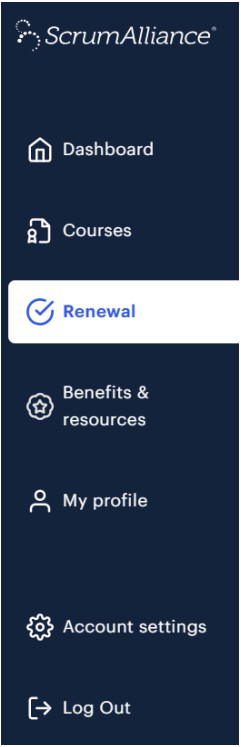
Once logged in, on the left hand panel, you will get the option “Renewal”
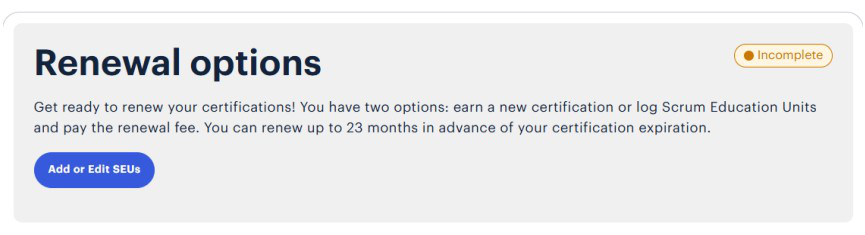
On the right hand side panel, click on “Add or Edit SEUs” button.
3. Manage SEUs
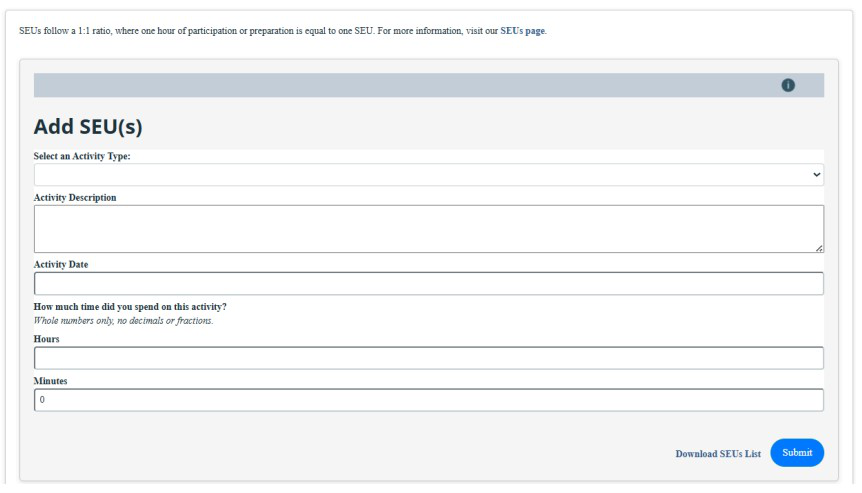
Scrum Alliance divides SEUs into Activity Types such as:
- Learning (Examples include reading books or articles, preparing a presentation, and watching a webinar.)
- Events (Get SEUs for attending Global Scrum Gatherings, Regional Scrum Gatherings, User Group activities, and any other agile events or trainings.)
- Volunteering (Add SEUs for any non-compensated services you offer or volunteering activities completed.)
- Other (Scrum/Agile activities – Add all learning and activities to your log to show your knowledge growth.)
Note, after completing a training or course (e.g. PSM, PMP, SAFe trainings etc), choose:
Activity Type: Learning
4. Add Activity Details
Fill in the following fields:
- Activity Description
- Activity Date
- How much time did you spend on the activity
- Hours
- Minutes
Tip: 1 hour of learning = 1 SEU
5. Submit the Entry
Click Submit and the SEUs will appear in your SEU dashboard.
Once you accumulate enough SEUs, proceed to renew your certification.
For more details about SEUs: https://www.scrumalliance.org/get-certified/scrum-education-units
Part 2: How to Claim PDUs from PMI (Project Management Institute)
For PMP®, PMI-ACP®, PgMP®, and other PMI certifications
PMI requires PDUs every 3 years to maintain certifications. If your training provider is a third-party (not pre-approved by PMI), follow these steps:
Steps for Claiming PDUs
(Rewritten and polished from your provided content)
1. Log in to PMI.org
Go to https://www.pmi.org/ and log in.
Navigate to your dashboard and click on Report PDUs.
2. Choose “Course or Training”

On the next screen, under the Education section, select:
Course or Training
3. Enter the Training Provider
Since the course is offered by a third-party vendor (not pre-approved by PMI):
- Type the provider’s name manually
- Do NOT select any provider from the dropdown list
4. Fill in the Course Details
Complete all required fields:
- Course Name
- Description
- Course Start Date
- Course End Date
- Optional fields : Course URL, Contact Person Details (Name, Phone Number, Email ID)
This helps PMI verify your learning activity.
5. Assign PDUs Under the PMI Talent Triangle™
You will need to manually enter PDU values under:
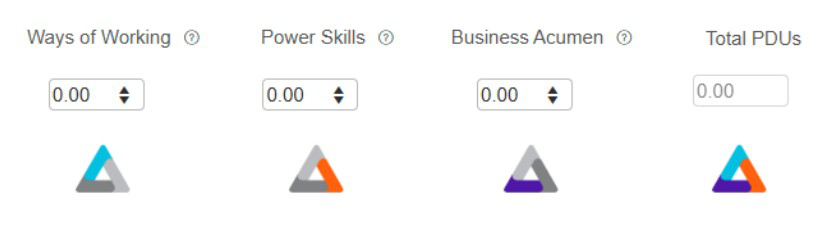
- Ways of Working (Knowledge, skills, and behaviors related to specific domains of Project, Program, and Portfolio Management.)
- Power Skills (Knowledge, skills and behaviors specific to leadership-oriented, cross-cutting skills that help an organization achieve its business goals.)
- Business Acumen (Knowledge of and expertise in the industry or organization that enhances performance and better delivers business outcomes.)
If you hold multiple PMI certifications, PDUs will automatically apply to all applicable ones.
6. Agree to the Terms
Select:
“I agree this claim is accurate”
7. Submit Your Claim
Click Submit.
You’ll receive:
- A confirmation message
- Transaction details
- Claim IDs for each certification
You may print the receipt or proceed to report additional PDUs.
Final Tips for Easy Renewals
Maintain a running list of your SEUs and PDUs
Don’t wait until the last month—add them after each learning event.
Keep proof of attendance
Even if not required, it helps during audits.
Attend Meetups and Webinars
Many community events offer free SEUs/PDUs.
Conclusion
Claiming SEUs and PDUs is simple when you know the steps.
Whether you completed a Scrum, Agile, AI, or leadership course, following the above process ensures your certifications stay active—and your learning journey continues smoothly.
Upcoming Trainings
← Scroll to see more →
Related Posts